

tpPLC
by TP-Link Corporation Limited
TP-Link tpPLC lets you easily manage your powerline devices via smart device.
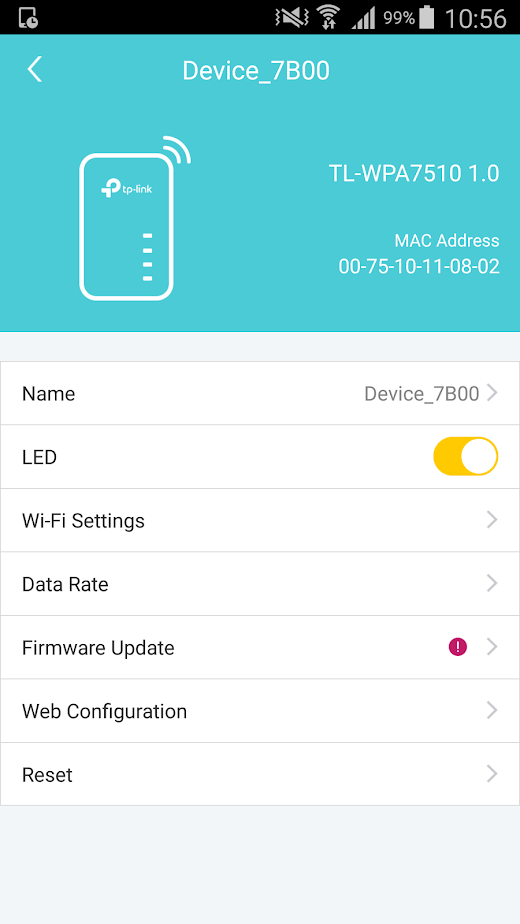
tpPLC
Simply connect your smart device to the Wi-Fi network of a compatible TP-Link powerline extender and start managing with ease.
It will list all the compatible powerline adapters and powerline extenders in your current network, and allow you to manage your powerline devices individually as well as the whole powerline network with a few taps.
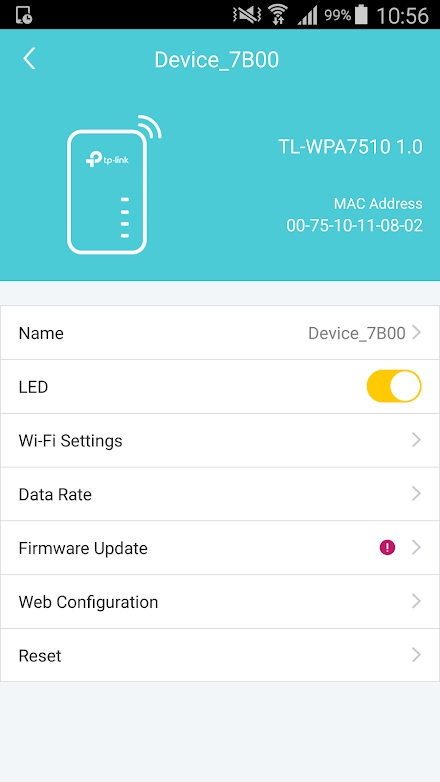
★Features• Display information of all compatible powerline devices in the current network.• Manage a powerline device such as changing its device name, turning on or off its LEDs, viewing its data rate, resetting to factory defaults, and removing it from the current network.
For a powerline extender, you can also change and schedule its Wi-Fi settings, and redirect to the web management interface.• Manage the whole powerline network such as adding a new powerline device, setting a new powerline network name, and turning on or off the LEDs on all the powerline devices in the network.Compatible Devices:To use this app, you need to be connected to the Wi-Fi network of a powerline extender below (listed hardware versions and above):TL-WPA4220V2TL-WPA4220V3TL-WPA4220V4TL-WPA4530V1TL-WPA7510V1TL-WPA7510V2TL-WPA8630V1TL-WPA8630V2TL-WPA8630PV1TL-WPA8630PV2TL-WPA8730V1TL-WPA9610V1More coming soon…- Fixed some bugs.
About tpPLC
- Package name (App ID)
- com.tplink.tpplc
- Available on
- Google Play
- Price
- Free
- Version
- v1.3.5
- Updated
- September 27, 2020
- Developer
- TP-Link Corporation Limited
Looking for the tpPLC APK?
The safest way to get tpPLC (com.tplink.tpplc) on your Android device is to install it directly from Google Play — you'll always get the latest official version, automatic updates, and no risk of modified or infected APK files from third-party sites.

Social Features
Connect and share with friends and the community.
Gaming Features
Enjoy immersive gaming experience with various game modes.
Learning Tools
Enhance your learning experience with interactive features.
See tpPLC in Action


What Our Users Say
Don't just take our word for it. Here's what our users have to say about this Android app.
"Does not support earlier versions. Better to use pc, although the pc app redirect you to a Web page for WiFi settings. It does seem like reviews for this app are falling on deaf ears. Shame as the product itself works well."
"No longer works. Im so glad the updates fixed all those Issues I didnt have and removed all functionality."
"Could be great, just frustrating"
"Pretty poor for TP-Link. Renaming devices lasts for at least 5 seconds before returning to default. WPS for WiFi settings works fine, until power is lost like relocating the device after setup, then back to default. Seems everything just loves to be DEFAULT!"
"What is the point of this app? Pure rubbish. It refuses to connect to the to devices. I have tried to connect to 3 different wifi extender units. It will not accept the powerline keys."
"Perfect to manage the power line network."
"Worked for a day or so, now glitches"
"I'm on the same wireless network as the AV500 TL-WPA4220 and it can't find it. Disappointing AV500 TL-WPA4220 is not supported after only a few years. Please TPLink think about how you could support your older products with this phone app until the actual physical hardware no longer works."
"Only showing 4 devices when I have 6"
"Cannot rename devices!!!!!"
Frequently Asked Questions
Is tpPLC free?
Yes, tpPLC is free to download and install on Android through Google Play.
How do I install tpPLC on Android?
Open Google Play on your Android phone or tablet, search for tpPLC by TP-Link Corporation Limited or tap the Google Play button on this page, then tap Install. The app downloads and installs automatically.
What is com.tplink.tpplc?
com.tplink.tpplc is the App ID (package name) of tpPLC on Google Play. Every Android app has a unique package name, and it is the safest way to verify you are installing the official app.
Is tpPLC safe to download?
Installing tpPLC from Google Play is the safest option: you get the official version published by TP-Link Corporation Limited, verified by Google Play Protect, with automatic updates. Avoid APK files from unofficial third-party sites.
Get tpPLC Today
tpPLC for Android — free download on Google Play.
Compatible with Android phones and tablets — available on Google Play.
Ask AI about this app
Get instant answers about features, tips and more from popular AI assistants.